Powerlabs UI Design challenge
Powerlabs UI Design challenge
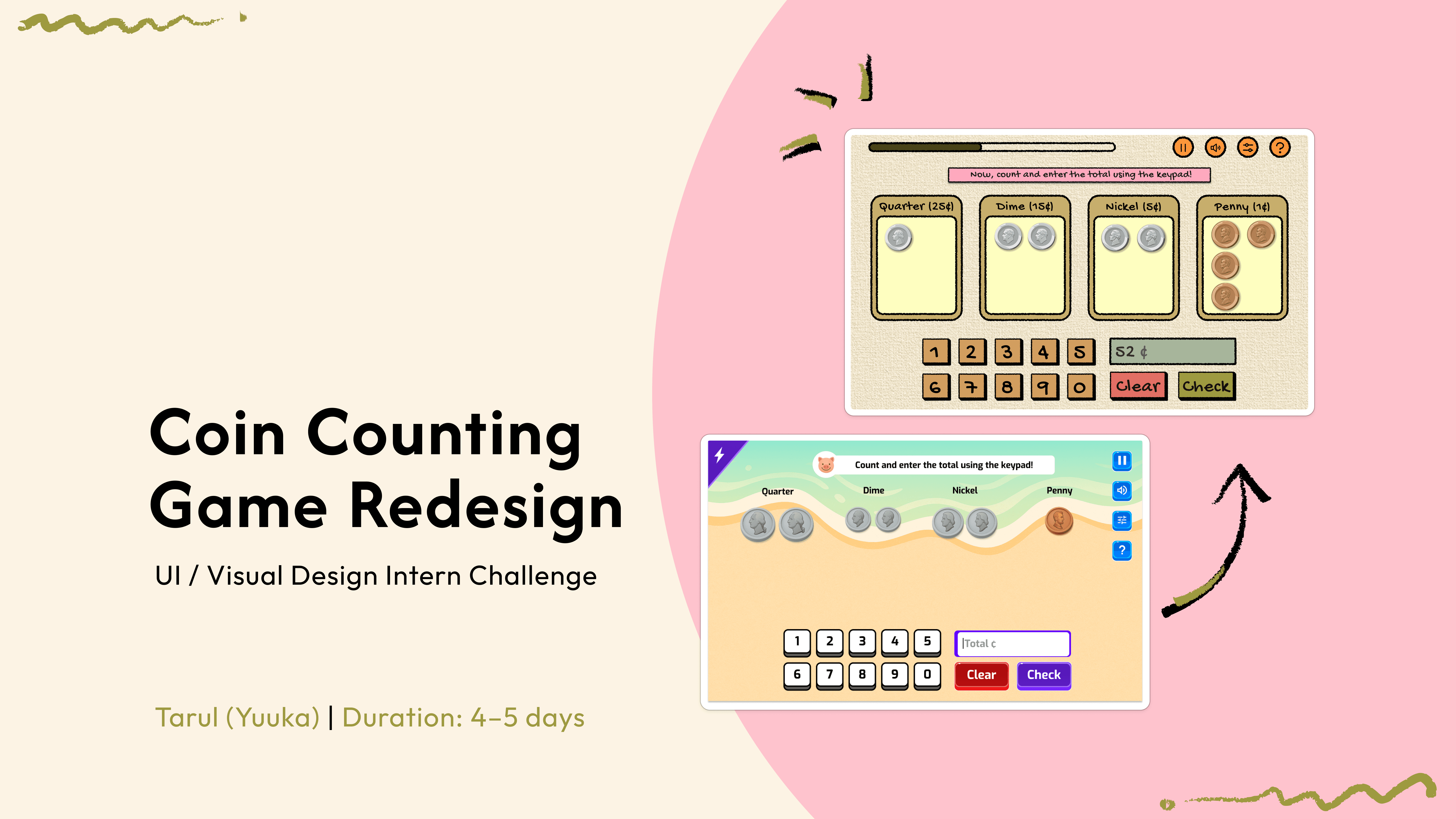
This project involved redesigning a coin-counting educational game for Playpower Games to improve clarity, engagement, and learning reinforcement for Grade 2–3 students.
The experience was redesigned into a guided three step flow that supports progressive learning through sorting, counting, and totaling coins. A handmade classroom visual system and consistent UI components create a warm, accessible environment, while immediate supportive feedback reinforces understanding and reduces cognitive load.
This project involved redesigning a coin-counting educational game for Playpower Games to improve clarity, engagement, and learning reinforcement for Grade 2–3 students.
The experience was redesigned into a guided three step flow that supports progressive learning through sorting, counting, and totaling coins. A handmade classroom visual system and consistent UI components create a warm, accessible environment, while immediate supportive feedback reinforces understanding and reduces cognitive load.
The Problem
The Problem
The existing coin-counting experience for Playpower Games lacked a structured learning flow and clear interaction feedback, making it harder for Grade 2–3 students to understand the step-by-step process of grouping, counting, and totaling coin values. The interface needed improved clarity, guidance, and engagement to better support early learners.
The Problem
The existing coin-counting experience for Playpower Games lacked a structured learning flow and clear interaction feedback, making it harder for Grade 2–3 students to understand the step-by-step process of grouping, counting, and totaling coin values. The interface needed improved clarity, guidance, and engagement to better support early learners.
The Problem
The existing coin-counting experience for Playpower Games lacked a structured learning flow and clear interaction feedback, making it harder for Grade 2–3 students to understand the step-by-step process of grouping, counting, and totaling coin values. The interface needed improved clarity, guidance, and engagement to better support early learners.
The Problem
The existing coin-counting experience for Playpower Games lacked a structured learning flow and clear interaction feedback, making it harder for Grade 2–3 students to understand the step-by-step process of grouping, counting, and totaling coin values. The interface needed improved clarity, guidance, and engagement to better support early learners.
The Solution
A guided three-step interaction model was designed to support progressive learning: sorting coins, calculating group values, and combining totals. A handmade classroom visual system was developed to create a warm, familiar learning environment. High-fidelity UI screens, consistent component states, and immediate supportive feedback patterns were implemented to reinforce understanding, reduce cognitive load, and encourage confident interaction.
The Solution
A guided three-step interaction model was designed to support progressive learning: sorting coins, calculating group values, and combining totals. A handmade classroom visual system was developed to create a warm, familiar learning environment. High-fidelity UI screens, consistent component states, and immediate supportive feedback patterns were implemented to reinforce understanding, reduce cognitive load, and encourage confident interaction.
The Result
The redesigned experience provides clearer task structure, more intuitive interactions, and supportive feedback that reinforces learning through action. Visual grouping, consistent UI behavior, and positive reinforcement create a more engaging and accessible experience tailored to early learners.
The Result
The redesigned experience provides clearer task structure, more intuitive interactions, and supportive feedback that reinforces learning through action. Visual grouping, consistent UI behavior, and positive reinforcement create a more engaging and accessible experience tailored to early learners.

More Projects Coming Soon..!
YEP! Thats the end of this project, but you can also check these out :D
YEP! Thats the end of this project, but you can also check these out :D
More Projects Coming Soon..!

CONTACT
WORK
ABOUT
HOME